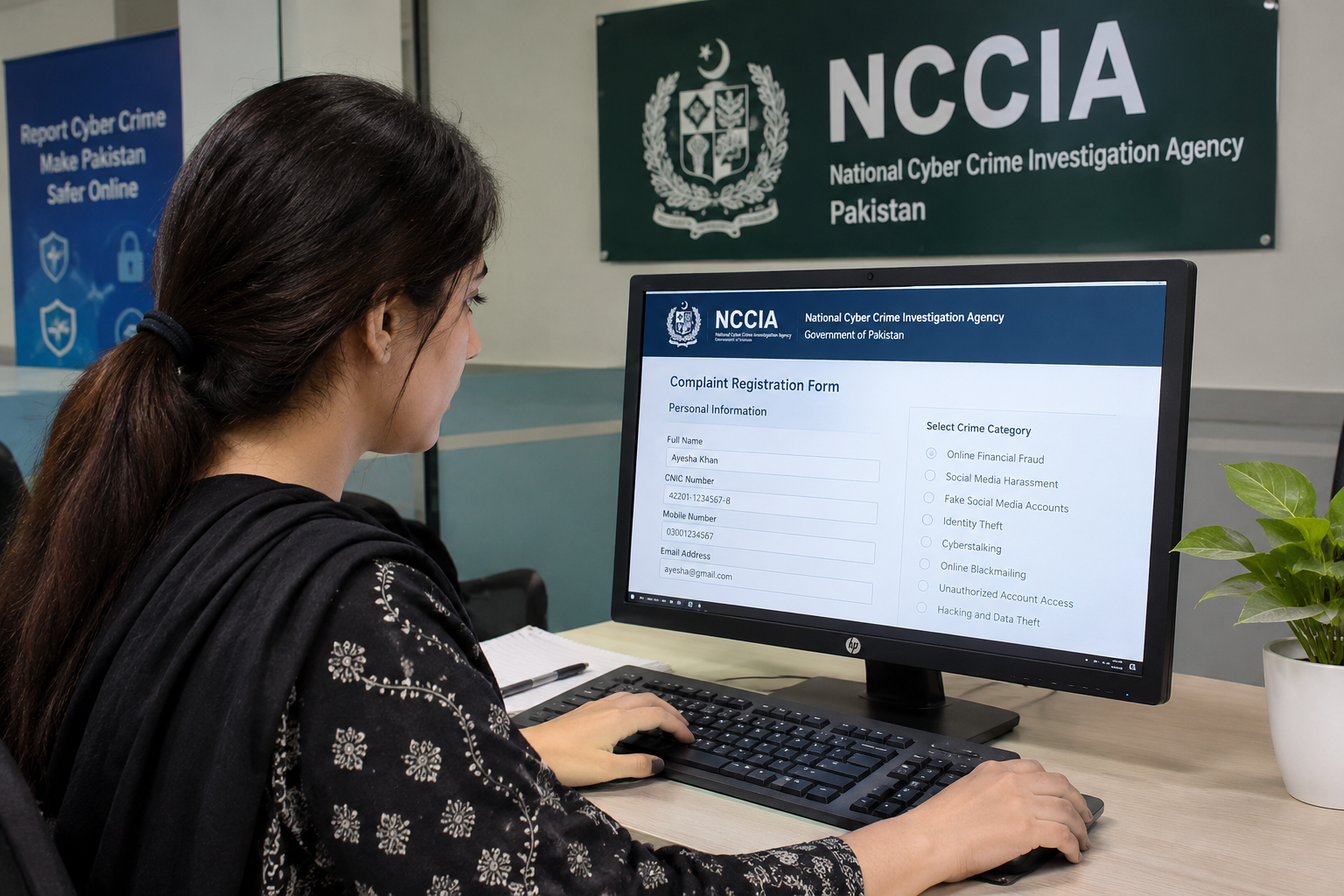
The increasing use of the internet has made online communication, digital banking, and social media an important part of everyday life in Pakistan. However, the growth of digital technology has also increased cybercrime activities such as online fraud, hacking, identity theft, social media harassment, blackmailing, and unauthorized access to personal accounts.
If you become a victim of cybercrime, knowing where and how to report the incident is important. In Pakistan, the National Cyber Crime Investigation Agency (NCCIA) is responsible for handling cybercrime-related inquiries and investigations under the applicable legal framework.
NCCIA provides different complaint registration methods to help citizens report suspicious online activities and digital crimes. You can submit an initial complaint online, contact the helpline, send an email, or visit a nearby Cybercrime Reporting Centre.
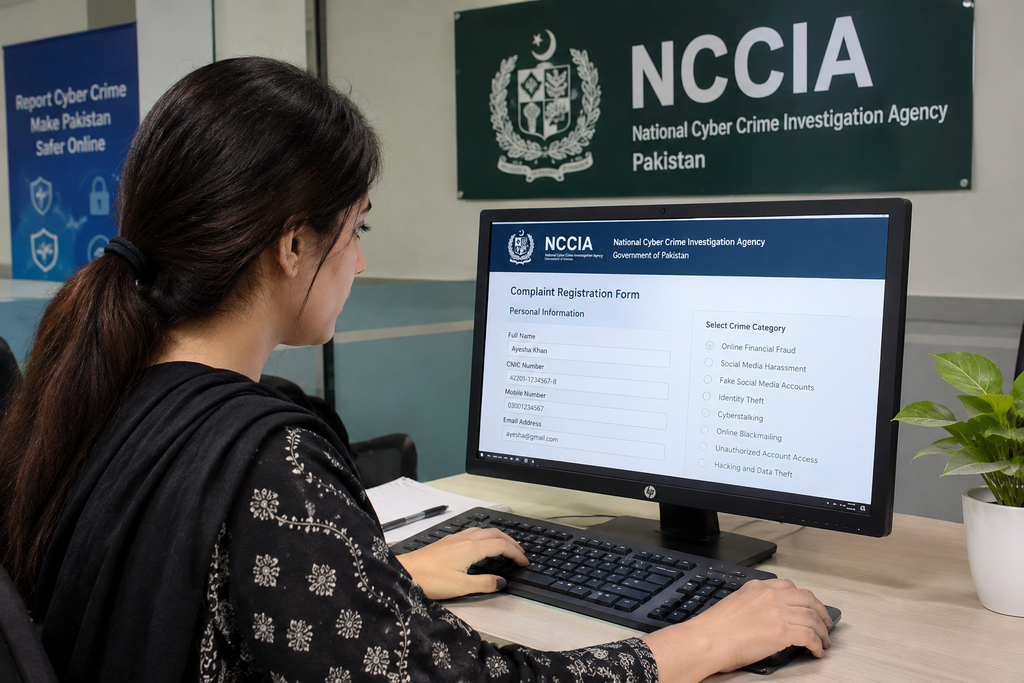
In this guide, you will learn how to file a complaint in NCCIA Pakistan, which documents are required, how the online complaint process works, and what steps you should take after submitting your report.
What Is NCCIA in Pakistan?
NCCIA stands for National Cyber Crime Investigation Agency. It is a government law enforcement agency operating under Pakistan’s Ministry of Interior and Narcotics Control.
The agency was established to investigate cybercrime and address unlawful activities involving computers, digital devices, electronic communication, and online platforms.
Under Section 29(1) of the Prevention of Electronic Crimes Act (PECA), as amended in 2025, NCCIA is the authorized agency for cybercrime inquiries, investigations, and prosecutions.
The agency deals with different types of digital offences, including:
- Online financial fraud and scams.
- Social media harassment and cyberstalking.
- Identity theft and impersonation.
- Unauthorized access to digital accounts.
- Online blackmailing and extortion.
- Hacking and data theft.
- Threatening messages and other unlawful online activities.
NCCIA provides complaint registration facilities so that individuals can report cybercrime incidents and seek assistance through the appropriate legal process.
How to File a Complaint in NCCIA Online?
Filing an initial complaint through the NCCIA online complaint form is a convenient way to report cybercrime in Pakistan.
The online registration process requires you to provide personal information, contact details, and a clear description of the incident.
Follow the steps below to understand how to complete the complaint registration process.
Step 1: Open the NCCIA Complaint Form
First, open your internet browser and search for the official National Cyber Crime Investigation Agency complaint portal.
Find the official complaint registration form and open it.
The form contains different sections where you need to enter your personal information and incident details.
Before proceeding, make sure you are using the genuine government complaint platform. Avoid sharing your CNIC or personal information with unknown websites or individuals claiming to represent NCCIA.
Step 2: Enter Your Personal Information
After opening the complaint form, provide your personal information accurately.
The registration form asks for details such as:
- Full name.
- CNIC number.
- Mobile phone number.
- Email address.
- Occupation.
- Postal address.
- City.
Enter your complete name according to your CNIC. The form requires a 13-digit CNIC number without dashes and an 11-digit mobile number starting with 03.
Make sure your contact information is correct because the agency may need to contact you for additional information or complaint verification.
Do not provide incorrect or misleading details during registration.
Step 3: Select the Crime Category
If the complaint form asks you to identify the nature of your incident, select the category that best describes your problem.
Common cybercrime categories include:
- Online financial fraud.
- Social media harassment.
- Fake social media accounts.
- Identity theft.
- Cyberstalking.
- Online blackmailing.
- Unauthorized account access.
- Hacking and data theft.
Choose the category that most closely matches your situation.
If you cannot identify the correct category, explain your problem clearly in the incident description rather than selecting an unrelated option.
Step 4: Explain the Cybercrime Incident
Now provide a detailed explanation of what happened.
This section is important because it helps the agency understand your complaint and determine what additional information may be required.
Your incident description should include:
- The date and approximate time of the incident.
- How the suspected cybercrime occurred.
- The website, application, or social media platform involved.
- Relevant usernames, phone numbers, or account details.
- Any financial loss or personal damage.
- Communication with the suspected individual.
- Evidence available to support your complaint.
For example, if someone has cheated you through an online payment scam, explain how the person contacted you, what amount you transferred, when the transaction occurred, and what happened afterward.
Keep your explanation factual and organized. Avoid unnecessary personal comments or unsupported accusations.
You should also preserve screenshots, transaction receipts, emails, messages, and other relevant records.
Step 5: Review and Submit the Complaint
Before submitting the form, carefully check all the information you have entered.
Make sure:
- Your full name is correct.
- Your CNIC number is accurate.
- Your phone number is active.
- Your city and address are correct.
- Your incident description is understandable.
- Your supporting information is accurate.
- You have completed the required security verification.
Once everything is correct, select the Submit Complaint option.
After successful submission, the system may generate a complaint reference number.
Save the confirmation receipt and reference number. These details can help you follow up with NCCIA regarding your complaint.
Remember that submitting an initial online complaint does not necessarily complete the formal verification process. NCCIA’s published guidance requires an in-person visit to a Cybercrime Reporting Centre for verification.
Other Ways to File a Complaint in NCCIA
If you cannot complete the online registration process, there are other ways to report cybercrime in Pakistan.
NCCIA provides several complaint reporting methods for individuals who need assistance.
1. Pakistan Citizen Portal
Citizens can use the Pakistan Citizen Portal to register complaints about different government-related matters, including cybercrime-related issues.
Provide accurate information and select the appropriate complaint category when submitting your report.
2. Email Complaint
You can send your complaint to the NCCIA helpdesk through its official email service.
Include your full name, contact information, a clear incident description, and relevant supporting evidence.
Keep a copy of your email for future reference.
3. Visit a Cybercrime Reporting Centre
You can visit the nearest NCCIA Cybercrime Reporting Centre to submit a written application and supporting documents.
Take your original CNIC, a copy of your identification document, and relevant evidence.
An officer can guide you about the complaint verification and investigation procedure.
4. NCCIA Helpline
Another option is to contact the agency through its 24/7 helpline.
The official NCCIA cybercrime helpline number is 1799.
You can explain your situation and ask about the appropriate reporting procedure.
Documents Required to File an NCCIA Complaint
Before filing a complaint, prepare the necessary documents and evidence. Having relevant information available can make the registration and verification process easier.
NCCIA’s published guidance identifies three basic requirements:
- A written complaint application containing your name, address, city, and contact information.
- A copy of your CNIC.
- Copies of supporting evidence.
Depending on your complaint, additional information may also be helpful.
| Document or Evidence | Why It Is Important |
|---|---|
| CNIC copy | Confirms your identity |
| Written application | Explains the incident |
| Screenshots | Shows messages, threats, or suspicious activity |
| Transaction receipts | Supports financial fraud complaints |
| Bank statements | Documents financial transactions |
| Phone numbers | Helps identify relevant contacts |
| Social media usernames | Identifies online profiles |
| Emails and messages | Preserves communication records |
For financial fraud complaints, keep payment receipts, transaction IDs, and relevant bank records.
For harassment complaints, preserve screenshots, profile information, and messages containing threats or abusive content.
Always keep original evidence wherever possible. Do not edit screenshots or delete important conversations.
What Types of Complaints Can You Report to NCCIA?
NCCIA handles different types of cybercrime complaints involving digital devices, electronic communication, and online platforms.
Some common examples are explained below.
1. Online Financial Fraud
If someone uses fake websites, fraudulent investment offers, online shopping scams, or deceptive payment requests to steal money, you can report the suspected incident.
2. Social Media Harassment
You can report suspected online harassment, threatening messages, repeated unwanted communication, and other potentially unlawful activities.
3. Fake Social Media Accounts
If someone creates a fake account using your name, photographs, or identity to deceive or harm others, you can report the incident.
4. Online Blackmailing
If someone threatens to share your private information, photographs, or personal conversations to demand money or other benefits, preserve the evidence and report the matter.
5. Unauthorized Account Access
If someone accesses your email, social media, or other digital accounts without permission, you can report the incident.
6. Identity Theft
The unauthorized use of your personal information or digital identity may involve cybercrime. Preserve any evidence showing how your information was misused.
7. Cyberstalking and Online Threats
Repeated threatening messages, intimidation, and other potentially unlawful online conduct can also be reported.
The agency evaluates complaints according to the circumstances and applicable legal provisions. A disagreement or ordinary platform-policy violation does not automatically constitute a criminal offence.
How to Contact NCCIA in Pakistan
If you need assistance with a cybercrime complaint, you can contact NCCIA through its official helpline, email, or regional reporting centres.
Here are some important contact details:
| Contact Method | Details |
|---|---|
| NCCIA Helpline | 1799 |
| Helpline Availability | 24/7 |
| Official Email | [email protected] |
| Headquarters | Islamabad, Pakistan |
| Gilgit Office | +92 5811 960707 |
| Gilgit Office Location | Near GDA Office, River Road, Chinarbagh, Gilgit |
The Gilgit office is particularly relevant for residents of Gilgit-Baltistan who need assistance with cybercrime reporting.
For other cities, NCCIA maintains regional offices in Islamabad, Rawalpindi, Lahore, Karachi, Peshawar, Abbottabad, Quetta, Faisalabad, Multan, Hyderabad, and other locations.
Contact numbers and office arrangements may change. Confirm the latest details with the agency before visiting a reporting centre.
Can You File an NCCIA Complaint Without Visiting an Office?
You can submit an initial cybercrime complaint online without immediately visiting an NCCIA office.
However, online submission and formal complaint verification are two different steps.
According to NCCIA’s published FAQ, complainants are required to visit a Cybercrime Reporting Centre in person for verification under the applicable procedure.
Therefore, completing the online form does not necessarily mean that you can handle the entire formal complaint process remotely.
If you are unable to visit an office, contact the NCCIA helpline and explain your circumstances. Ask the agency about the applicable procedure and any available assistance.
Overseas Pakistanis have a separate arrangement. They can nominate a focal person, such as a relative or legal counsel residing in Pakistan, to pursue their complaint at a Cybercrime Reporting Centre.
What Should You Do After Filing a Complaint?
After submitting your NCCIA complaint, take some additional steps to protect your personal information and preserve important evidence.
1. Save Your Complaint Reference Number
Keep your complaint registration number and confirmation receipt. You may need these details when contacting NCCIA about your case.
2. Preserve Supporting Evidence
Save all relevant screenshots, messages, emails, transaction receipts, and other records. Keep original files whenever possible.
3. Secure Your Digital Accounts
If your account has been compromised, immediately change your password and activate two-factor authentication.
If your banking information is involved, contact your bank through its official customer support service.
4. Follow Up on Your Complaint
You can contact NCCIA through its helpline and provide your complaint reference number to ask about the status of your report.
5. Avoid Direct Confrontation
Do not threaten or confront the suspected individual. Avoid taking actions that could put your personal safety or investigation at risk.
6. Report Additional Evidence
If you discover new information after submitting your complaint, ask NCCIA how you can provide the additional evidence.
7. Be Careful of Fake Representatives
Do not pay unknown individuals who promise guaranteed complaint approval or faster investigations. Use official communication channels when dealing with the agency.
Frequently Asked Questions
1. How can I file a complaint in NCCIA Pakistan?
You can submit an initial cybercrime complaint through the official NCCIA online complaint registration facility. You can also report the incident through the Pakistan Citizen Portal, email, or a nearby Cybercrime Reporting Centre. Formal verification may require an in-person visit.
2. What is the NCCIA helpline number?
The official NCCIA cybercrime helpline number is 1799. It is advertised as a 24/7 helpline for citizens who need assistance with cybercrime complaints.
3. Is a CNIC required for an NCCIA complaint?
Yes. The official online complaint form requires a 13-digit CNIC number without dashes. A copy of your CNIC is also included in NCCIA’s basic document requirements for complaint registration.
4. Can I report online fraud to NCCIA?
Yes. You can report suspected online financial fraud, fake investment schemes, payment scams, and other internet-based financial crimes. Keep transaction receipts, bank statements, payment details, and relevant conversations as supporting evidence.
5. Can I file a complaint about social media harassment?
Yes. You can report suspected social media harassment, online threats, cyberstalking, blackmailing, and identity misuse. Preserve screenshots, account usernames, profile details, and relevant messages.
6. How long does NCCIA take to resolve a complaint?
There is no guaranteed resolution period for every complaint. The time required depends on the nature of the incident, available evidence, investigation requirements, and case complexity. You can contact NCCIA with your complaint reference number to request an update.
7. Can overseas Pakistanis file an NCCIA complaint?
Yes. Overseas Pakistanis can report cybercrime incidents. According to NCCIA’s published guidance, they should nominate a focal person, such as a relative or legal counsel residing in Pakistan, to pursue the matter at a Cybercrime Reporting Centre. Relevant identification and contact details of the nominated person are required.
Final Words
Knowing how to file a complaint in NCCIA Pakistan is important for anyone who experiences online fraud, social media harassment, identity theft, blackmailing, or other cybercrime activities.
NCCIA provides different reporting methods to help citizens submit complaints and seek assistance. You can begin by submitting an online complaint, contacting the helpline, sending an email, or visiting a nearby Cybercrime Reporting Centre.
Before reporting an incident, prepare your CNIC, written application, screenshots, transaction records, and other supporting documents. Provide accurate information and save your complaint reference number for future follow-up.
Remember that online safety also requires taking precautions. Protect your passwords, avoid suspicious links, enable two-factor authentication, and never share sensitive personal information with unknown individuals.
If you become a victim of cybercrime, do not ignore the incident. Report it through the appropriate official channels and follow the required verification procedure to help the relevant authorities address your complaint.

Admin